Track your hours in blocks. Invoice them in one click.

No timer to remember, no hours to reconstruct. Pick when you worked and for how long — ClaroHQ turns it into an invoice and a client-ready timesheet.

No credit card required · Export anytime

A Simpler Way to Track Time and Get Paid

Block Your Time

Forget about start/stop timers. Simply block out chunks of time for your projects. It's more natural and less disruptive to your workflow.

Generate Your Invoice

Transform your time blocks into professional invoices. No manual calculations, no forgotten hours—just clean, accurate billing.

Keep Clients Informed

Automatically share progress timesheets with your clients. Build trust with transparency and keep everyone on the same page.

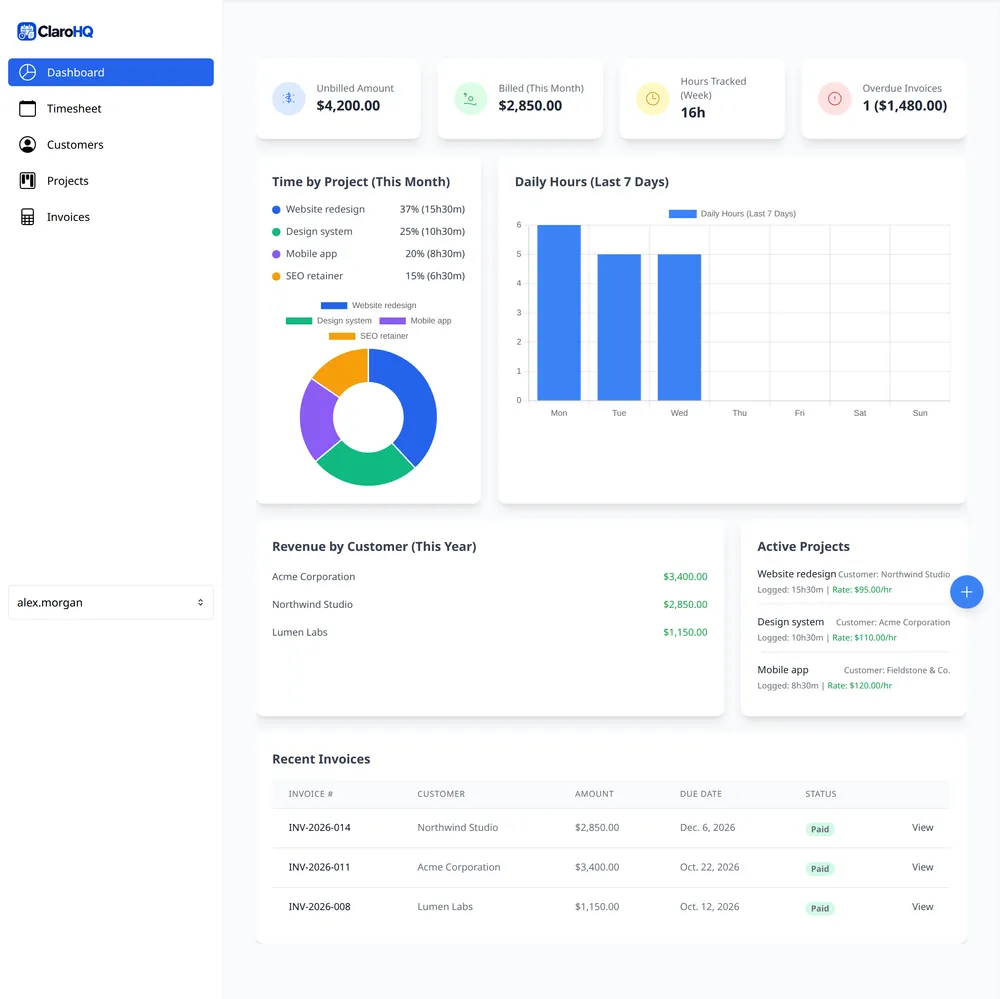
ClaroHQ dashboard showing unbilled and billed amounts, hours tracked and time by project

Which One Are You?

The tool you use now is probably good at what it does. The question is what happens between doing the work and sending the invoice — and what that gap costs you.

Spreadsheet

This is you if… you bill a handful of clients and the invoice is a file on your desktop.

What works

  • It's free, and it does exactly what you tell it.
  • The whole year is in one place you control.

What it costs you

  • Every invoice is rebuilt by hand, from hours you reconstructed afterwards.
  • Between invoices, the client sees a total and nothing else.

Stay if… you want total control and already bill the same amount every month.

Toggl or Clockify

This is you if… you start a timer, stop it, and reconcile the entries at the end of the month.

What works

  • Timing is precise to the second, if you remember to run it.
  • The free tiers are generous enough to start on.

What it costs you

  • The timer has to be started. Forget, and the hours are simply gone.
  • An interruption turns one stretch of work into fragments you have to add back up.

Stay if… you need reporting deeper than a timesheet and an invoice.

ClaroHQ

This is you if… you know how long things take, and you'd rather log the block than watch a clock.

What works

  • Pick a start time and a duration. The block is the record, and you can add or edit one after the fact.
  • Blocks become an invoice and a client-ready timesheet, without retyping anything.
  • A block can be seven minutes or three hours, so whatever increment a client bills in, the block is set to match.

You don't have to migrate. Your history stays where it is and you start blocking new work here — or email us and we'll help you bring it across. If you ever leave, one click exports everything.

We Left Things Out on Purpose

Most time tracking tools are built for teams with managers, approvals, and a billing department. ClaroHQ is built for one person doing the work and sending the bill. The features below aren't missing—they're absent on purpose, because every one of them makes the thing you actually need slower.

Gantt charts and capacity planning
A timeline is a way for a manager to see other people's work. You already know your own schedule.
Timesheet approvals
Nobody approves your hours. A second click before you can bill your own work is a management feature, not a billing one.
Utilization and profitability dashboards
These are useful when you're allocating people across projects. For one person, the numbers that matter are hours worked and what to invoice.
Roles and permissions
There is one role. Every permission screen would be a decision about a team that doesn't exist.
Screenshots and activity monitoring
Monitoring exists so a manager can verify work they can't see. You were there.
Per-seat pricing
You have one seat. Charging per seat is the business model that produces the other five.

What's left is the job itself: block the time, turn it into an invoice, send the client a timesheet. Priced for one freelancer—free to start, and from $4/month on the yearly plan.

Start for Free. Grow When You're Ready.

Starting out? The free plan covers your first client. Billing more than one? Pro.

Free

For freelancers just getting started.

$0 forever

  • One project and one client — enough to bill a first job properly.
  • Three invoices — enough to find out whether this fits how you work.
  • Three client timesheet notifications — enough to see what automatic reporting feels like.
Get Started for Free

Pro

Most popular

For established freelancers ready to scale.

$4 /mo, billed yearly

$48 billed once a year — you save $36

  • Unlimited projects and clients
  • Unlimited invoices
  • Unlimited client timesheet notifications
Start Free, Upgrade Later

Every plan includes time blocking, invoicing, and client timesheets. The only difference is how many of each.

I Built This Because I Was Tired of Hating My Time Tracking Software.

As a freelance developer, I wasted hours with start/stop timers and messy spreadsheets. So I created ClaroHQ - a simpler way to track time and get paid, designed for freelancers like us.

Josh, Founder of ClaroHQ

Does This Sound Familiar?

You hate timer pressure

The constant anxiety of remembering to start and stop a timer during every task.

Block out your time instead

Simply select when you start and for how long. No timers, no stress, just blocks of focused work.

Manual invoicing eats your time

Recreating invoices from scattered time logs is tedious and error-prone.

Generate invoices in one click

Your time blocks automatically become accurate, professional invoices. No manual math required.

Clients question your hours

Without transparency, clients doubt your timesheets, leading to awkward conversations.

Send automated timesheet reports

Clients receive regular progress updates automatically. Trust through transparency, no conversations needed.

Built by one person, on purpose.

ClaroHQ is built and supported by one person. That's why it's this small, and why support comes from the person who actually wrote it.

There's no sales team, no account manager, and no onboarding call. I use ClaroHQ every day to run my own freelance work, and the email goes to me: [email protected]

  • Leaving is cheap. Export everything you've logged in one click.
  • No card to start. The free plan doesn't ask for payment details.

Questions Before You Start

Everything below is a real answer, including the parts that aren't in our favour.

What if I forget to start a block?

Nothing is lost. Add the block when you remember — at lunch, or at the end of the week. There is no timer that had to be running, so a forgotten block costs a few seconds, not a billable afternoon.

What if I get interrupted mid-block?

That's the thing time blocking is designed to prevent. A block is a decision about what gets your attention for the next stretch, and you're the one holding that boundary — notifications off, door shut, whatever it takes. If something genuinely gets through, keep the time you actually worked and log the rest as a separate block. That's a cleanup, not a workflow.

What does my client see?

Only their own projects: a total for the period, then each block with its date, project, note, and exact duration. They don't see your rates, invoice totals, or another client's work, and they never log in. The one thing worth knowing is that the note on a block is shown, so write it the way you'd want it read.

Do I have to move my old Toggl or Clockify data?

No. You can start with your next block and leave the archive where it is. If you'd rather bring your history across, there's no self-serve importer, but email [email protected] and I'll help you import it — free.

I bill fixed-price, not by the hour. Is this for me?

Yes. Invoices take manual line items, so you can bill a flat fee exactly as you'd write it on paper — no hours required. Blocking time is optional, but it's the cheapest way to check a fixed price: log what a project actually took, compare it to what you charged, and you'll know which prices to raise next time.

Does it connect to my accounting software?

No. There are no accounting or payment integrations, and adding them would make ClaroHQ the thing it is trying not to be. Invoices carry your remittance details, so the client pays you directly and you record it wherever you do your books.

Does it handle more than one currency?

Yes. You can bill a client in a currency other than your own, and the invoice shows it correctly.

Can I get my data out?

Yes. One click in account settings exports everything you have logged. No lock-in, no export fee, no support ticket.

Free to start. No card, and no reason to stay if it doesn't fit.

Ready to Simplify Your Workflow?

Streamline your time tracking and invoicing with ClaroHQ.
Start for free, no credit card required.